


WhatsApp does not treat all messages the same. Every business message must fit a specific category.
That category decides three critical things:
If the WhatsApp template approval process succeeds.
How much it costs.
How risky it is for your account.
Many businesses fail here. They write excellent messages but pick the wrong category. This leads to rejections, higher costs, and account issues.
This guide explains all four WhatsApp template categories clearly.
What Are WhatsApp Message Templates?
WhatsApp Message Templates are pre-approved message formats required for initiating chats with users.
You must use them when:
You start a chat with a user.
The user has not replied in 24 hours.
Templates protect users from spam and help WhatsApp control platform abuse. They only work with the WhatsApp Business API.
If you are not sure what that is, read What Is WhatsApp Business API? A Beginner’s Guide.
Note: Always reference the official Meta WhatsApp template rules for the latest compliance.
Official reference: Meta WhatsApp Business Platform
Why Template Categories Matter So Much
Each template must match specific user intent. WhatsApp algorithms and reviewers check:
Why you are messaging.
What the user expects.
How the message feels (tone and content).
If the intent is unclear or feels wrong, the template fails.
Choosing the correct categories leads to faster approval, lower risk, and stable pricing. Wrong categories cause friction and operational delays.
Marketing Templates Explained
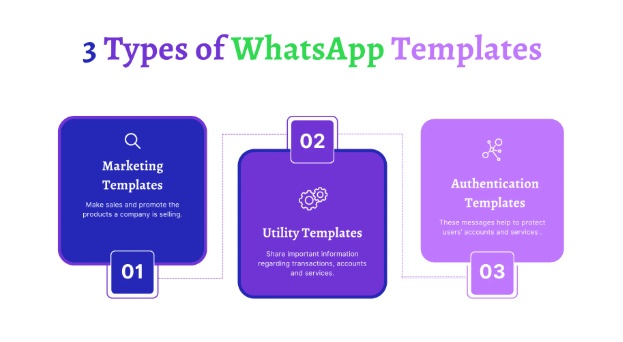
WhatsApp marketing templates are flexible messages used to promote products, services, or brand awareness.
These are optional messages. Users did not explicitly request this specific update at that moment.
Common uses include:
Sales offers and seasonal promotions.
Discount codes.
Product launches.
Event invitations.
Because of their promotional nature, they cost the most and face strict review. You also need strong, explicit user opt-in before sending them.
Compliance Rule: Marketing templates must be honest. Avoid pressure language or fake urgency. If users block these WhatsApp message types often, your quality score drops fast.
[Read: How to Broadcast Unlimited WhatsApp Messages with Zero Bans]
Utility Templates Explained
WhatsApp utility templates share specific, useful updates related to an action the user already took.
These messages confirm transactions or provide essential status updates.
Examples:
Order confirmations.
Shipping and delivery updates.
Payment receipts.
Booking reminders.
These messages are expected. Users want them. Because of this high relevance, approval is easier, costs are lower, and blocking risk is minimal.
Compliance Rule: Utility templates must stay neutral. You cannot include offers, sales lines, or upsells here.
[See: Official Utility Category Guidance]
Authentication Templates Explained
WhatsApp authentication templates are strictly for verifying user identity and securing accounts.
They facilitate login or account access processes.
Common uses:
One-time passwords (OTP).
Login codes.
Account verification steps.
These templates follow the strictest rules. They must be short, clear, and free of extra text. You cannot sell, promote, or add branding lines (like slogans) in these messages.
Any misuse leads to immediate rejection. This category often has fixed pricing in most regions to support security workflows.
Service Templates Explained
WhatsApp service templates help users resolve specific inquiries or finish ongoing tasks.
They are directly linked to active support scenarios.
Examples:
Customer support ticket updates.
Service status alerts.
Step-by-step troubleshooting help.
These messages feel personal and continue an active conversation. They should never promote products. If a service message includes a sales pitch, WhatsApp treats it as marketing, causing rejection.
How Categories Affect Pricing
Each category carries a different cost structure. WhatsApp pricing templates logic is based on the value and intent of the message.
Pricing Hierarchy:
Marketing: Costs the most.
Utility: Costs significantly less.
Authenticatio:Fixed, lower rates.
Service: Generally low risk.
Wrong categories increase spend. Correct categorization keeps your costs stable and predictable.
[Read: Detailed WhatsApp Pricing Breakdown]
How to Choose the Right Template Category
Ask one clear question to determine the correct category: Why am I sending this message?
To sell or promote? Select Marketing.
To inform about an order? Select Utility.
To verify identity? Select Authentication.
To help resolve an issue? Select Service.
Warning: Never try to cheat the system. WhatsApp detects misuse easily. Short-term savings on category costs often result in long-term damage to your account health.
Common Template Mistakes Businesses Make
Avoid these frequent errors to ensure high approval rates:
Selling inside utility templates: Do not add "Check out our new items" to a receipt.
Adding offers to service messages: Keep support chats purely helpful.
Using vague wording: Be specific about the message purpose.
Mixing two purposes: Each template must do one job. Nothing more.
How WUSeller Helps With Templates
WUSeller follows Meta rules strictly to protect your business.
We help with:
Professional template writing.
Accurate category selection.
Fixing rejected templates.
Cost control strategies.
[See: Get Template Support]
Final Thoughts
WhatsApp template categories control everything: your approval speed, your costs, and your account safety.
Pick the right category. Write clear messages. Respect user intent. Do this right once, and you can scale your messaging safely forever.
For more guides, visit our resources page.