


WhatsApp controls how businesses send messages. You cannot start with high volume. You cannot scale overnight.
Every WhatsApp Business API account follows limits and quality rules.
If you ignore them, your account slows down. If you respect them, WhatsApp rewards you with scale.
This guide explains how it works and covers the latest 2025/2026 portfolio updates.
What Are WhatsApp Message Limits?
WhatsApp message limits determine the number of unique users you can message in a rolling 24-hour period.
These limits apply mainly to:
- Business-initiated messages
- Campaign messages
- Template messages
Replies from users do not count the same way.
Important Update: As of October 7, 2025, messaging limits are Portfolio-Wide. They are no longer set per individual phone number.
If your portfolio has a 100k limit, any new number you add immediately shares that 100k capacity.
WhatsApp uses limits to protect users from spam. Every business account starts with a low limit to prove trust.
Source: Meta WhatsApp Business Platform
WhatsApp Sending Tiers Explained
WhatsApp sending tiers define your daily messaging volume.
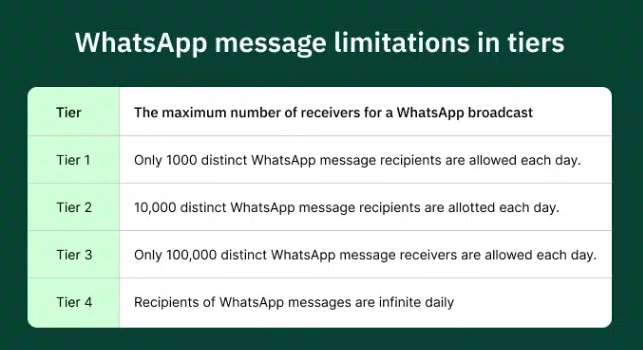
Each tier allows you to message more unique users per day.
The New Tier Structure:
- Tier 1: 250 unique users per day (New starting limit).
- Tier 2: 2,000 unique users per day.
- Tier 3: 10,000 unique users per day.
- Tier 4: 100,000 unique users per day.
- Tier 5: Unlimited users.
You do not choose your tier. WhatsApp assigns it automatically.
Your tier increases only when WhatsApp trusts your behavior. Trust is built over time through consistent quality.
What Is WhatsApp Quality Rating?
WhatsApp quality rating measures how people react to your messages.
It is not about how many messages you send. It is about how users feel.
WhatsApp tracks:
- Message blocks
- Spam reports
- Negative feedback
Based on this, your account shows:
- High quality (Green)
- Medium quality (Yellow)
- Low quality (Red)
Critical Update: Meta has removed the "Flagged" status. Your messaging limit will no longer be automatically downgraded if your quality rating drops. However, a "Low" rating prevents you from upgrading to the next tier.
[See: WhatsApp message quality Monitoring Guide]
Why Quality Rating Matters More Than Volume
Many businesses try to send more too fast. This is where problems start.
WhatsApp cares more about:
- User experience
- Relevance
- Engagement
High volume with poor reactions signals spam. Low volume with strong replies signals trust.
Quality always comes first. If quality drops, your ability to scale stops.
Signals That Improve Your Quality Rating
WhatsApp looks for positive user actions.
Good signals include:
- Replies to messages.
- Continued conversations.
- Saved contacts.
- Low block rates.
When users reply, WhatsApp sees value. This is why WhatsApp performs better than email.
Data Insight: HubSpot reports significantly higher engagement in chat-based channels compared to traditional email.
Signals That Hurt Your Quality Rating
Some actions hurt fast. Avoid these to prevent WhatsApp ban prevention triggers.
Avoid:
- Messaging without clear opt-in.
- Sending generic sales blasts.
- Sudden spikes in daily volume.
- Poor targeting.
Even one bad campaign can freeze your tier.
[See: WhatsApp compliance 2026 Checklist]
How Message Limits Increase Over Time
There is no request button. WhatsApp increases limits automatically.
Growth happens when:
- Quality: You maintain a Medium or High quality rating.
- Status: Your phone number status is "Connected".
- Usage: You use at least 50% of your current limit within a rolling 7-day period.
New Scaling Speed: Meta now evaluates limit increases every 6 hours (previously 24 hours). This allows high-quality businesses to scale much faster.
If quality drops, growth pauses. If quality stays strong, limits increase.
Safe Habits That Help You Scale
Scaling safely requires discipline.
Best habits include:
- Warming up new accounts slowly.
- Increasing volume step by step.
- Segmenting users by interest.
- Sending helpful content first.
Avoid jumping from 250 to 2,000 messages instantly without a plan. Warm-up is critical.
[See: WhatsApp scaling rules and Warm-up Guide]
Templates and Message Limits
Business-initiated messages require templates. Templates affect quality directly.
Good templates:
- Match the opt-in reason.
- Use simple language.
- Offer value.
Bad templates feel spammy. They increase blocks.
Pricing Note: Effective July 1, 2025, WhatsApp uses per-message pricing for all template categories (Marketing, Utility, Authentication). However, service conversations (user-initiated) are free if you reply within 24 hours.
[See: WhatsApp Template Message Writing & Approval Help]
WhatsApp Business App vs API Limits
The Business App is designed for small use.
Business App:
- Manual sending.
- Very low limits.
- No real scaling support.
WhatsApp Business API:
- Portfolio-based limits.
- Scalable automation.
- Campaign control.
For serious growth, the API is required.
[See: Comparison Guide]
How WUSeller Helps You Scale Safely
WUSeller focuses on long-term safety.
We help businesses:
- Set up WhatsApp Business API limits correctly.
- Warm up accounts using the new portfolio rules.
- Write safe, engaging templates.
- Plan campaigns that protect quality.
We do not chase risky volume. We build sustainable channels.
Final Thoughts
WhatsApp scaling is earned. Not forced. Not rushed.
Respect users. Protect quality. Grow steadily.
If you do this, WhatsApp rewards you with access to millions of users.
For more guides, visit our resources page.